Operating Systems
Monday 2011-02-14
Aquaria supports three operating systems — Windows, Mac OSX, and Windows. It doesn't perform well under Windows on the S10-3t, and Mac OSX is obviously not an option, so that leaves Linux (which is my preference anyway). The question is, what distribution to use? Multitouch under Linux (and I mean normal Linux, not systems with a different userspace like Android) is still in its infancy, or at least adolesence. Leading the way are two distributions: Ubuntu, maintained by Canonical, and MeeGo, maintained by Intel and (sort of) Nokia under the auspices of the Linux Foundation.
Ubuntu

The Ubuntu developers have been working on the uTouch library for over a year, in preparation for touch-enabling their Unity desktop shell. I have tried the 11.04 alpha version (“Natty Narwahl”) and the stable 10.10 release (“Maverick Meerkat”).
Like every pre-release version of Ubuntu I have ever tried, Natty suffers from instability — for the first week I had it installed I couldn’t get the new Unity interface to run. Now that it does it fails to display any programs, making launching applications difficult since they have also removed the Alt-F2 shortcut to the “Run Application” dialog. However, it does seem quite slick and more touch-oriented than the standard GNOME 2 shell. Multitouch gestures to not seem to be supported, neither on the S10-2t’s touchscreen nor touchpad. I have not yet determined if this is a hardware support issue or if they are simply not enabled by default. Running the gesturetest tool reveals that two-finger gestures are being recognized.
I have also installed the desktop version of Maverick in search of a more stable system (and as a side-effect of MeeGo’s kerfuffle with my partition table — see below). It works just fine, with the exception of wireless, which doesn't even show up in dmesg [see update below]. Other teams have reported that its netbook interface, an earlier version of Unity, works well. I will try this in the coming week, as well as investigate the wireless issue (which no other team has reported).
MeeGo

I have had a much less positive experience with MeeGo (I tried Netbook version 1.1), which corrupted the partition dedicated to Natty when I attempted to use its installer to resize the partition. The partitioner also complains when you install to an ext3 partition (btrfs is supposed to be the default, despite the on-disk format being unstable, and ext4 is missing from the installer). Once I got it installed wireless didn’t work, nor did any multitouch interaction. The MeeGo repositories are rather limited, too, lacking the OpenAL library Aquaria uses for sound.
The touch interface is slick but has a few rough edges on the Lenovo hardware. The interface appears as a bar at the top of the screen with big, colorful, finger-friendly tabs that let you launch applications, manage windows, send Twitter updates, and modify settings. Unfortunately it can only be activated by pressing the Super (Windows) key, making it impossible to use when in tablet configuration. I presume that it could also be accessed via gesture, but those don’t seem to work.
Overall, Ubuntu appears to be the best option. Which version will depend on libraries — uTouch is getting a lot of work for Natty. I will continue with Maverick for now.
Update 2011-02-16
When I rebooted Maverick today for a kernel upgrade Jockey recognized the wireless card straight away — apparently I haven't rebooted since I installed, nearly a week ago. The battery life of this netbook is quite impressive.
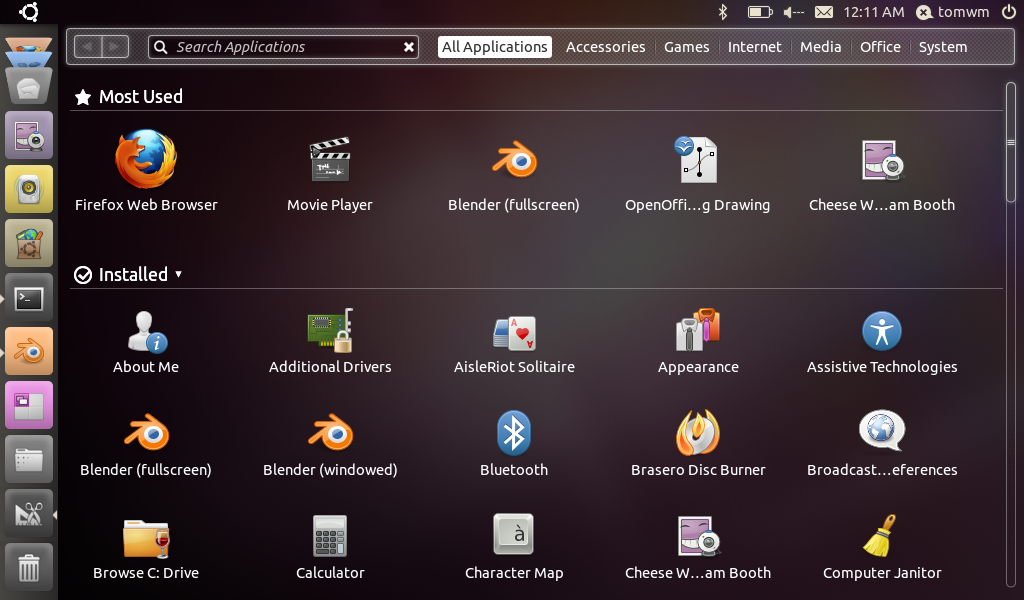
The Unity application launcher
I have also installed the Unity interface under Maverick. It works much better than that under Natty. Most importantly, the left-screen bar doesn’t hide itself, which is more finger-friendly than having to open it by hitting the small button in the upper-left.